Skill Issues
This is part 4 of a series, and expands on the Fen language I introduced in Part 3
We got Fen squared away, meaning that skills should be functional for most now, right? That means that we should start working on getting them implemented, but...
First Thing's First
When I started working on this update, I wound up overhauling Fen to v2. The first version is perfectly usable, but the second adds variable support as well as more complex instructions. You can, for example, do this now:
var test is target stat attack
target damage test
if not target type fruit
set target type fruit
else
mul test 3
end
mul test 2
target damage test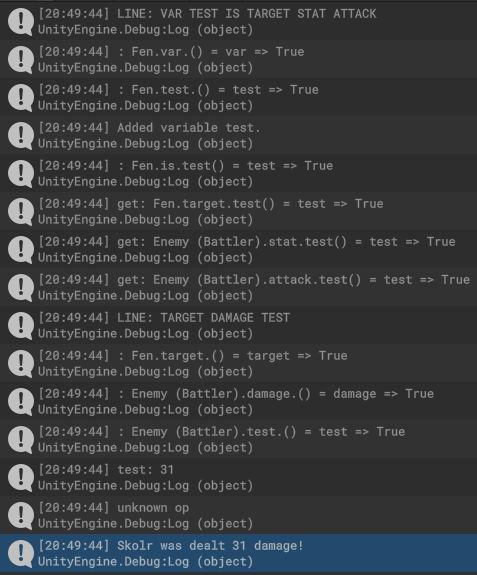
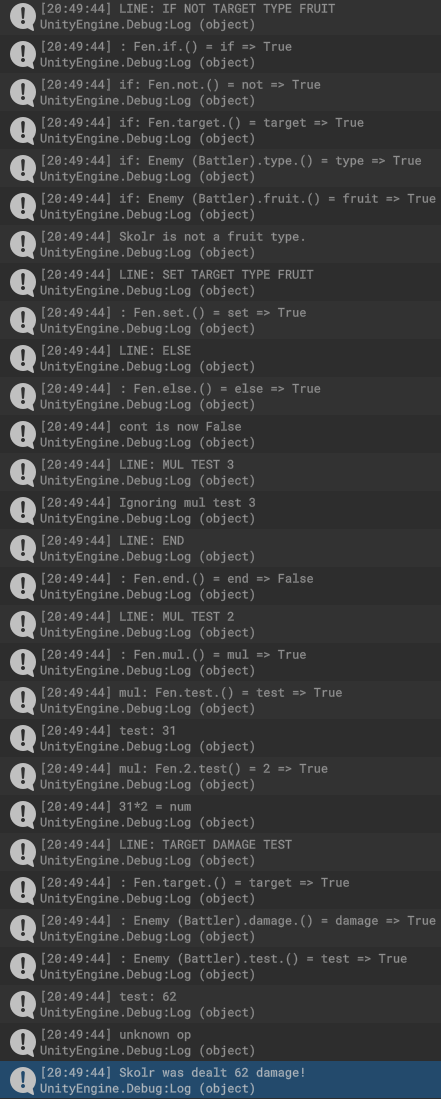
I don't want to make this entire post about this, but this is the package struct now:
public struct Package
{
    public List<string> instructions;
    public Dictionary<string, object> properties;
    public string op, prop;
    public bool cont;
    public Fen.Context ctx;
    public object scope, value;

    public string func;
    public bool more => instructions.Count > 1;
    public string next => instructions[1];
    public T Value<T>() => (T)value;

    public Package Next() => Next(false);

    public Package Next(bool setValue)
    {
        if (instructions.Count == 0) return this;
        func = instructions[0];
        instructions.RemoveAt(0);

        if (prop == null || setValue) value = func;

        Debug.Log($"{op}: {scope}.{func}.{prop}() = {value} => {cont}");

        if (properties.ContainsKey(func))
            return Property();

        if (ctx.ContainsKey(func))
            return Scope();

        switch (scope)
        {
            case IFen:
                var fen = scope as IFen;
                if (fen.Functions().ContainsKey(func))
                    return fen.Functions()[func](this);
                break;
        }

        return this;
    }

    public Package Property()
    {
        prop = func;
        var pVal = properties[prop];
        value = properties[prop];
        Debug.Log($"{prop}: {pVal}");

        float.TryParse((string)pVal, out var num);

        switch (op)
        {
            case "mul":
                var mul = Next(true).Value<string>();
                num *= float.Parse(mul);
                Debug.Log($"{pVal}*{mul} = num");
                properties[prop] = num.ToString();
                break;
            default:
                Debug.Log($"unknown op {op}");
                break;
        }

        value = properties[prop];


        return Next();
    }

    public Package Scope()
    {
        scope = ctx[func];
        return Next();
    }

}
Explanation
- Nearly every single Fen function now returns Next()
- "not" has been removed
- Next() was moved to the package struct instead of being a parser function
- variables (Properties) are stored in a dictionary
Our constructor function is now:
public class Fen : IFen
{
    public class Context : Dictionary<string, IFen> { }

    public Fen(string script, Context ctx)
    {
        Package pkg = new() { cont = true, scope = this, ctx = ctx, properties = new() };
        var lines = script.Split('\n');
        foreach (var line in lines)
        {
            Debug.Log($"LINE: {line.ToUpper()}");
            pkg.prop = null;
            pkg.scope = this;
            pkg.op = "";
            pkg.instructions = line.Split(" ").ToList();
            pkg.func = pkg.instructions[0];
            if (!pkg.cont && !ignoresCont(pkg)) { Debug.Log($"Ignoring {line}"); continue; }
            pkg = pkg.Next();
        }
    }
Explanation
- The while loop was removed, as Next() is now recursive
- More things are reset per line
    public FenFunctions Functions() =>
        new()
        {
            {"if", pkg => If(pkg) },
            {"not", pkg => Not(pkg) },
            {"set", pkg => Set(pkg) },
            {"else", pkg => Else(pkg) },
            {"var", pkg =>  Var(pkg)},
            {"end", pkg => End(pkg) },
            {"is", pkg => Is(pkg) },
            {"mul", pkg => Mul(pkg) },
        };


    public Package Not(Package pkg)
    {
        pkg.cont = !pkg.Next().cont;
        return pkg.Next();
    }

    public Package Else(Package pkg)
    {
        pkg.cont = !pkg.cont;
        Debug.Log($"cont is now {pkg.cont}");
        return pkg;
    }

    public Package Var(Package pkg)
    {
        pkg.prop = pkg.Next().func;
        pkg.properties.Add(pkg.prop, null);
        Debug.Log($"Added variable {pkg.prop}.");
        return pkg.Next();
    }

    public Package End(Package pkg)
    {
        pkg.cont = true;
        return pkg;
    }

    public Package Is(Package pkg)
    {
        pkg.op = "get";
        pkg.properties[pkg.prop] = pkg.Next().value;
        return pkg.Next();
    }

    public Package Mul(Package pkg)
    {
        pkg.op = "mul";
        return pkg.Next();
    }
The updated functions, where you can see how Next() works.
So yeah. I'm debating on throwing Fen up on github as a generic C# project instead of dropping big code blocks here every time I figure out how to improve this thing. If I do, I'll be sure to mention when I'm using a new feature.
With that out of the way...
It's time to tame this beast
Our skill system asset is this:
[CreateAssetMenu(fileName = "New Skill", menuName = "Origin/Skill")]
public class Skill : ScriptableObject, IFen
{
    public enum Range { Melee, Ranged };
    public enum PowerType { Physical, Magical };

    public Range range;
    public PowerType type;
    public MonsterData signatureMonster;
    public Grade grade = Grade.C;
    public int power;
    [Range(1, 100)]
    public int accuracy, hits = 1, cost;
    public Skill linker;
    [Multiline(2)]
    public string description;
    [Multiline(4)]
    //Fen scripts
    public string onActivate, onHit, onMiss;

    public int instructionCount => (onActivate.Split(" ").Length + onHit.Split(" ").Length + onMiss.Split(" ").Length) * 3;
}
Just like with MonsterData, we're using a scriptable object for this one. Speaking of MonsterData, you might be wondering why we have a reference to one.
One of the secrets about Pokemon is that every move is based on a Pokemon, which is then often reused by any Pokemon that makes sense to use the move. We can take this concept to then assign every monster a move based on them, which allows us to take their stats and use them to calculate the "power" of the move.
  public void OnValidate()
  {
      if (signatureMonster != null)
      {
          power = (range, type) switch
          {
              (Range.Melee, PowerType.Physical) => signatureMonster[StatType.Attack] + signatureMonster[StatType.Strength],
              (Range.Ranged, PowerType.Physical) => signatureMonster[StatType.Attack] + signatureMonster[StatType.Dexterity],
              (Range.Melee, PowerType.Magical) => signatureMonster[StatType.Magic] + signatureMonster[StatType.Strength],
              (Range.Ranged, PowerType.Magical) => signatureMonster[StatType.Magic] + signatureMonster[StatType.Dexterity],
              _ => 0,
          };

          var accmul = (float)signatureMonster[StatType.Speed] / signatureMonster[StatType.Luck];


          var multiplier = (1f + (int)grade) / StatCount;
          power = (int)(power * multiplier);
          cost = ((power + ((hits - 1) * 5)) + instructionCount) / 5;
          if (hits > 1)
              power /= hits / 2;
          power = (int)(Mathf.Round(power / 5f) * 5);

          accmul -= power / 200f;

          accuracy = (int)(50 * accmul);
      }

  }
Explanation
- (range, type) is a tuple. They're basically like temporary structs, and are very powerful. We're using one here to compare two different enum combinations at the same time.
- DataMonster[StatType] has been changed to pass an int, because I mean it is supposed to be a shortcut.
- We grab different stats based on the tuple and add them together
- We're using a Switch Expression here, which is similar to a Switch Statement, but returns a value. Switch Expressions need to have the default "_" value, or it'll yell at you.
- By taking the grade and dividing it by the amount of stats, we can get a nice multiplier.
- We then calculate the cost by adding the amount of times the move hits, how many functions are used in its code, and of course the base power.
- We reduce the overall power based on the maximum hits. To avoid dividing by zero, we check if the hits are more than 1
- We round to the nearest 5th. It just looks nicer on the UI.
- accuracy is calculated by comparing the signature monster's luck by their speed. We also have a power penalty.
Which gives us this:
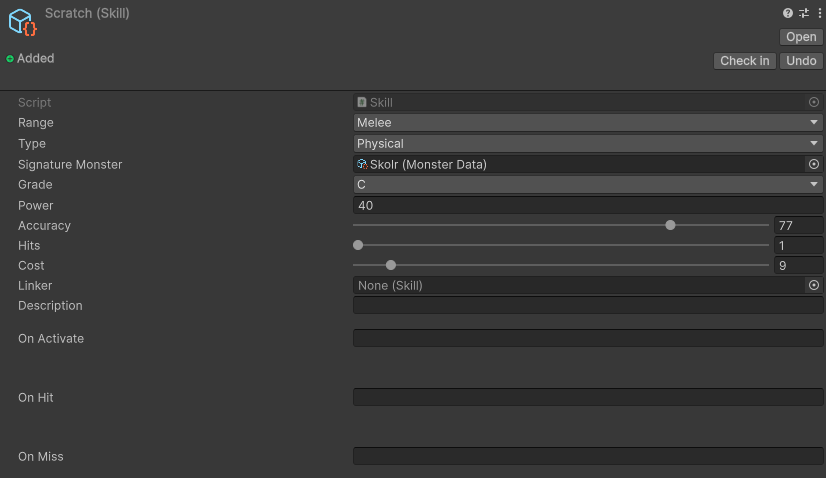
That's pretty good for now. Gives us what we need to get things going.
Learnsets
In a JRPG, a Learnset is an array of moves a class can learn, as well as the level they can do it. It's important for moves to feel like an upgrade, as it gives really gives weight to the levels and shows that they're gradually growing stronger.
Can we automate this too? Oh yes we can.
Since the goal today is to get the battle system functional, I'm going to only focus on attack moves. This means our learnset generation is going to be rather simple. What we need to do is use:
moves = Resources.LoadAll<Skill>("Data/Skills").ToList();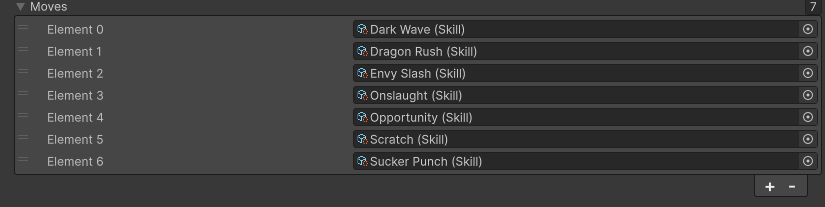
Resources.Load methods are generally very slow in runtime, so it's not advised anymore. However, since we're only generating the values in the Editor, it's fine.
Of course, now we're left with a bit of a problem. The skull dog can apparently learn "Dragon Rush" and "Sucker Punch" despite not being a dragon and not having fists.
What we need to do is add Tags.
Tags
Tags are easily one of the most powerful tools in procedural generation. The most efficient way to do it is to simply have a string like "insert, your, cool, tag, here". And while this is nice, if you're anything like me then you're going to forget that the moment you see a shiny thing on the ground.
There's also Bitmasking, which is basically an enum that can have multiple values, or flags. Flags are limited to how many bits are in the integer that you set the enum to. The default is an int32, so that's only 32 flags. You can absolutely set it to 64 instead by using a "long", which could suit your needs.
For now, we can do this approach, and just wrap the tag in a method so we can change it later.
    [System.Flags]
    public enum Tags : short
    {
        Cool = 1 << 0,
        Scary = 1 << 1,
        Sharp = 1 << 2,
        Tail = 1 << 3,
        Eyes = 1 << 4,
        Punk = 1 << 5,
        Fists = 1 << 6,
        Draconic = 1 << 7,
        Fluffy = 1 << 8,
        Bone = 1 << 9,
        Bulky = 1 << 10,
        Claws = 1 << 11,
    }
The enum I came up with based on my skull boy and the moves I've come up with
Explanation
- The System.Flags attribute tells Unity that you can select multiple values.
- 1 << x is a bitshift operation. We're shifting the flipped "1" bit by x amount of bits, so "0001", "0010", "0100", "1000"
Now our moveset retriever becomes:
void MakeMoveset()
{
    moves = Resources.LoadAll<Skill>("Data/Skills").ToList();
    moves.RemoveAll(x => !HasTag(x.tags));
}

public bool HasTag(Tags tag) => tags.HasFlag(tag);
Explanation
- RemoveAll uses a "predicate".
- Predicates are basically generic delegates that return bools.
- As Tags is a bitmask, this means that every tag defined on the skill must match
Which gives us:
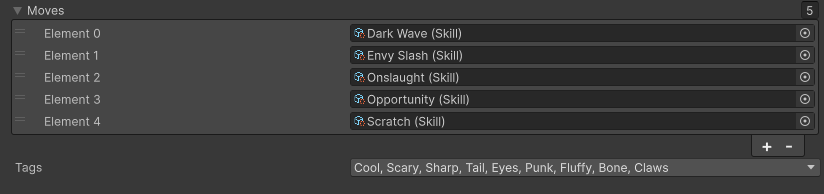
And that'll continue populating as we add new skills.
Creating the Learnset
Since we only have attack skills right now, we can sort our moves by using a somewhat naive approach. Later, we can simulate the move using actual damage calculation to sort it, but for now our calculation will be:
    public int RawDamage(Skill move)
    {
        var pow = 0;
        pow += this[move.range == Skill.Range.Melee ? StatType.Strength : StatType.Dexterity];
        pow += this[move.type == Skill.PowerType.Physical ? StatType.Attack : StatType.Magic];
        pow *= (int)(move.power * (move.hits / 2f));
        return pow;
    }
And the Learnset itself:
    void MakeLearnset()
    {
        if (moves.Count == 0) return;

        learnset.Clear();
        int level = 0;
        var grade = Grade.C;

        var sortedMoves = (from move in moves orderby RawDamage(move) select move).ToList();

        while (level < 100 && sortedMoves.Count > 0)
        {
            learnset.Add(new(level, sortedMoves[0]));
           if (grade != sortedMoves[0].grade && learnset.Count > 1) { level += 5; grade = sortedMoves[0].grade; }
            sortedMoves.RemoveAt(0);
            level += Random.Range(1, 5);
        }
    }
Explanation
- sortedMoves is some cheeky little code utilizing System.Linq's orderby keyword. What it's doing is ordering every move by the calculated power, one at a time. Then converting to a list
- If a move's grade is different than the current grade, we jump the levels up by 5.
- We then remove the top entry of sortedMoves and then increase the learn level by 1-5
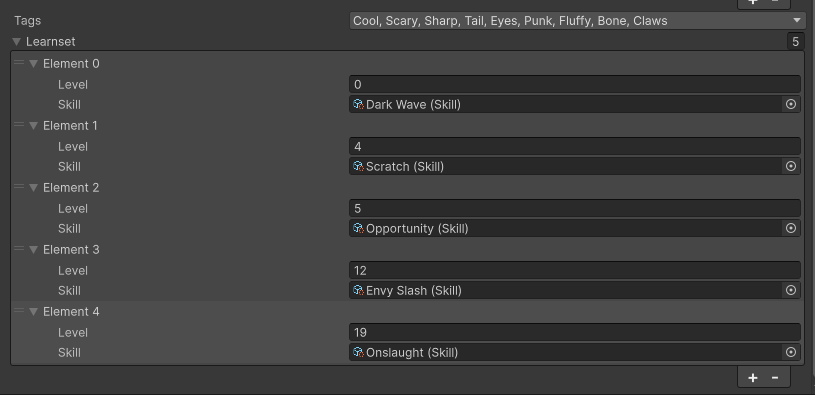
Of course, you can see here that Dark Wave--a move with 65 power right now--is considered the weakest move. This is because the skull doggo has a D in Magic and Dexterity, so it'd actually be very weak for him.
It's something to be aware of, and we'll see if it becomes a problem in the future.
Now onto IndividualMonster's moveset.
Moveset
In Pokemon, Pokemon only have 4 moves at a time. In Origin...
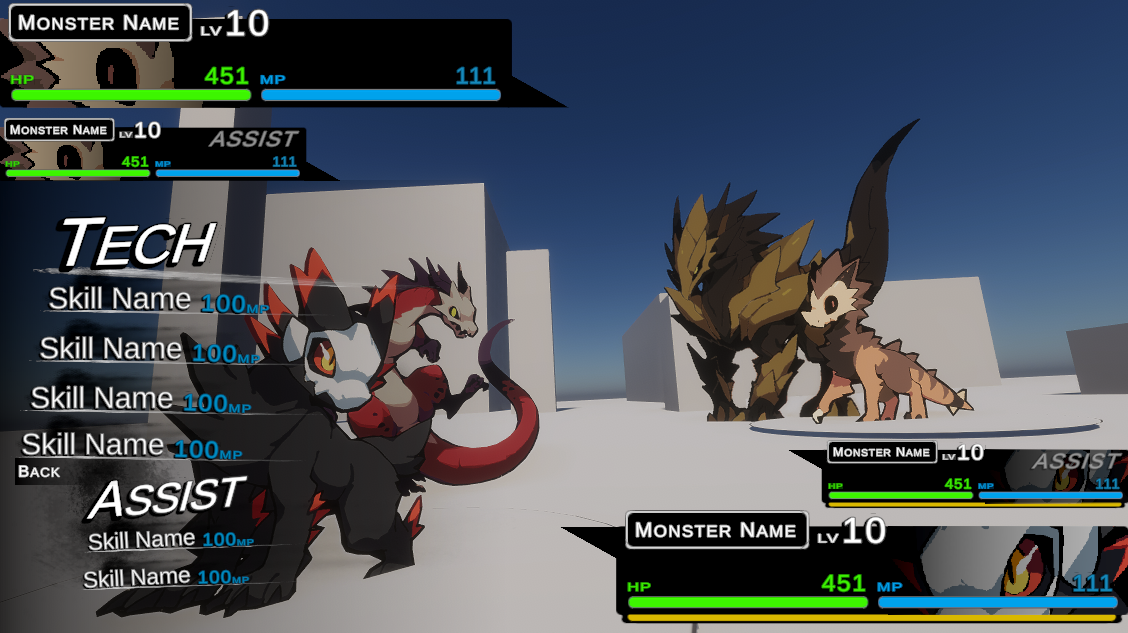
This means that you can summon a monster on your team for 2 additional moves. It's not a true double battle--double battles have the issue of making it so that you can setup and attack at the same turn--but it still allows for 6 moves total.
I'm still not gonna go into Assists until the prototype is done, but I still wanted to show this mockup off a little bit. For this post, we're just going to be doing the basic 4 moves.
We'll be appending IndividualMonster's Create method and adding this little snippit right here:
        var monMoves = data.learnset.ToList();
        Debug.Log($"{data.name} has {data.learnset.Count} moves");
        monMoves.RemoveAll(x => x.level > monster.level);
        Debug.Log($"{monster.name} can learn {monMoves.Count} moves");

        while (monster.skills.Count < 4 && monMoves.Count > 0)
        {
            var id = Random.Range(0, monMoves.Count);

            monster.skills.Add(monMoves[id].skill);

            monMoves.RemoveAt(id);
        }
Explanation
- You're probably wondering what's up with the ToList() if learnset's already a list. This is because lists are references even when another variable is given it. By doing ToList() we create a copy.
- We remove all moves that are too high of a level to learn
- We do a naive implementation where we simply grab 5 random moves from the learnset.
- Then the move is removed from our copy of the learnset.
- This is repeated either until we have 4 moves, or we run out.
Tech UI
The Tech option is what you see up there. It's comprised primarily of a class called Skill Card, which we can see here:
public class SkillCard : Selectable
{
    public Button button;
    public new TMP_Text name;
    public TMP_Text cost;
    public Transform description;
    public TMP_Text descriptionText;
    public TMP_Text power;
    public int id;
    public bool selected;


    // Start is called once before the first execution of Update after the MonoBehaviour is created
    new void OnEnable()
    {
        var monster = GameManager.instance.playerParty[0];
        if (monster.skills.Count < id) gameObject.SetActive(false);

        var skill = monster.skills[id];

        name.text = skill.name;
        cost.text = skill.cost.ToString();
        description.localScale = new(1, 0, 1);
        descriptionText.text = skill.description;
        power.text = skill.power.ToString();
    }


    public void Update()
    {
        selected = IsHighlighted();
        description.localScale = selected ? Vector3.Lerp(description.localScale, new(1, 1, 1), Time.deltaTime * 7) : Vector3.Lerp(description.localScale, new(1, 0, 1), Time.deltaTime * 7);

        var pRect = transform.parent.GetComponent<RectTransform>();

        pRect.sizeDelta = selected ? Vector2.Lerp(pRect.sizeDelta, new(300, 100), Time.deltaTime * 7) : Vector2.Lerp(pRect.sizeDelta, new(300, 50), Time.deltaTime * 7);
    }


}
Explanation
- Selectable is a class that can listen for when Unity's ui event handler is doing its thing.
- We use it to tell when the ui is moused over via IsHighlighted, and then do a cool little animation to show the description of the skill/move.
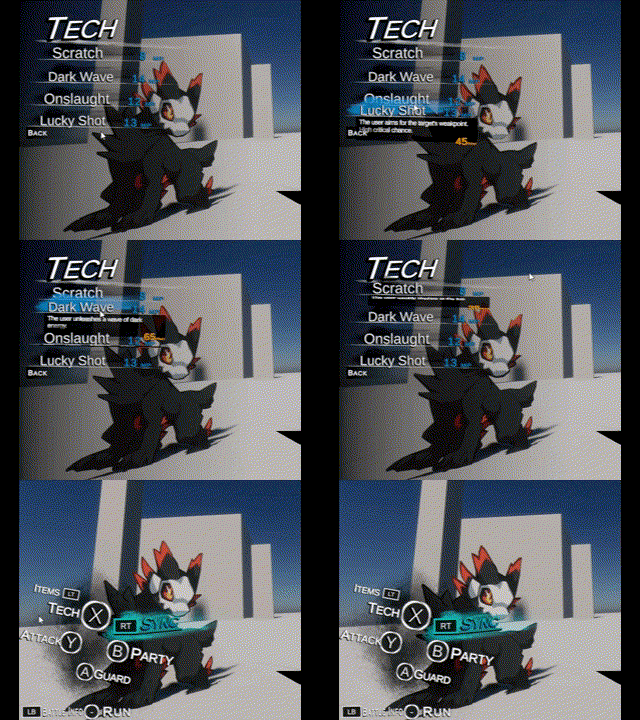
Phew. I was originally going to make a single post all about the battle system, but there was more work I had to do with Skills before we tackled that, and the Fen update took up a little too much more than I was hoping for. There's likely going to be a lot to cover before this system is done, so tune in for state machines, damage formulae, and a simple but effective predictive ai.
Member discussion